

Data is often called the new oil, but raw oil is useless without a refinery. For years, only tech giants with massive budgets could afford the high end Artificial Intelligence (AI) and Machine Learning (ML) infrastructure required to extract actionable insights from complex datasets. Enterprise platforms charged thousands of dollars per seat, leaving startups, small to medium businesses (SMBs), and independent developers looking through the window.
The narrative has completely changed. We are witnessing a massive democratization of data science. High performance, affordable AI software solutions for data analysis are disrupting the market, offering predictive modeling, natural language processing (NLP), and automated data cleaning at a fraction of the traditional cost.
If you want to scale your data capabilities without draining your financial reserves, this definitive guide reviews the best budget friendly, low cost, and open source AI data analytics tools available today.
Why Budget-Friendly AI Data Tools Are Essential
Relying on legacy spreadsheets or manual data sorting is a recipe for stagnation. Modern business generates multi-channel data from web analytics, CRM systems, social media feeds, and IoT devices. Manually connecting these dots is virtually impossible.
Implementing low-cost business intelligence software driven by artificial intelligence offers several distinct advantages:
Elimination of Human Error: Automated workflows clean and format your data with near perfect accuracy.
Real-Time Processing: Instead of waiting for end of month reports, you get live, streaming insights to make instant operational adjustments.
Predictive Capabilities: Cheap AI predictive analytics platforms allow small brands to forecast inventory demands, customer churn, and market trends with high precision.
No-Code Accessibility: Most modern, affordable platforms feature intuitive drag and drop interfaces, meaning you don't need a PhD in data science to operate them.

Top Affordable AI Software Platforms for Data Analysis
Let’s break down the best cost effective AI platforms dominating the industry, looking closely at their features, use cases, and pricing structures.
1. Polymer Search (The Best for No-Code Data Visualization)
Polymer Search turns loose, messy spreadsheets into a powerful, searchable AI database within minutes. It uses advanced AI to automatically analyze your data spreadsheet, identify patterns, and generate interactive dashboards.
Key Features: Auto generated pivot tables, AI assisted smart searches, instant correlation tracking.
Best For: Marketing analysts, content creators, and small e-commerce store owners who hate complex coding.
Pricing: Highly accessible tiers starting with free basic trials, making it perfect for bootstrapping teams.
2. Julius AI (The Ultimate AI Data Scientist Assistant)
If you can type a sentence, you can use Julius AI. This platform acts as a virtual data scientist. You upload your data (CSV, Excel, Google Sheets) and talk to it using natural language.
Key Features: Natural language data querying, automated Python code generation in the background, advanced regression modeling, and instant chart creation.
Best For: Developers and researchers who need complex statistical analysis done via simple chat commands.
Pricing: Extremely budget-friendly monthly plans compared to hiring an in-house data analyst.
3. Akkio (Best for Predictive Analytics and Lead Scoring)
Akkio is a powerhouse designed specifically for operations, sales, and marketing teams. It focuses heavily on predictive analytics, allowing you to easily forecast outcomes based on historical patterns.
Key Features: Automated lead scoring, revenue forecasting, customer churn prediction, and seamless integrations with HubSpot and Salesforce.
Best For: Agencies and growing B2B businesses focusing on data driven revenue generation.
Pricing: Affordable scalable tiers that grow alongside your business metrics.
4. KNIME (The Open-Source Titan)
For those looking for free AI data analytics tools with enterprise level capabilities, KNIME (Konstanz Information Miner) is an unmatched open source software. It uses a visual workflow interface where you connect different nodes to clean, transform, and model data.
Key Features: Thousands of community-built nodes, deep integration with R and Python, built in machine learning algorithms, and robust ETL (Extract, Transform, Load) capabilities.
Best For: Technical users, full-stack web developers, and engineering teams needing deep, uncompromised customization without licensing fees.
Pricing: Completely Free and open-source for the desktop version.

Key Features to Look for in Low-Cost AI Analytics Tools
When choosing an analytics tool from the saturated SaaS marketplace, do not judge a platform solely on its price tag. To ensure a high return on investment (ROI), verify that the tool possesses these foundational capabilities:
+---------------------------+--------------------------------------------------------+
| Feature                   | Why It Matters                                         |
+---------------------------+--------------------------------------------------------+
| Automated Data Cleaning   | Fixes broken formatting, null entries, and duplicates.  |
| Natural Language Queries  | Allows non-technical staff to ask data questions easily|
| Native API Integrations   | Syncs data smoothly with your CRMs, SQL, and Webhooks. |
| Exportable Visualizations | Generates clean PDFs and PNGs for client-ready reports.|
+---------------------------+--------------------------------------------------------+
Step-by-Step Strategy: Implementing AI Data Analytics on a Budget
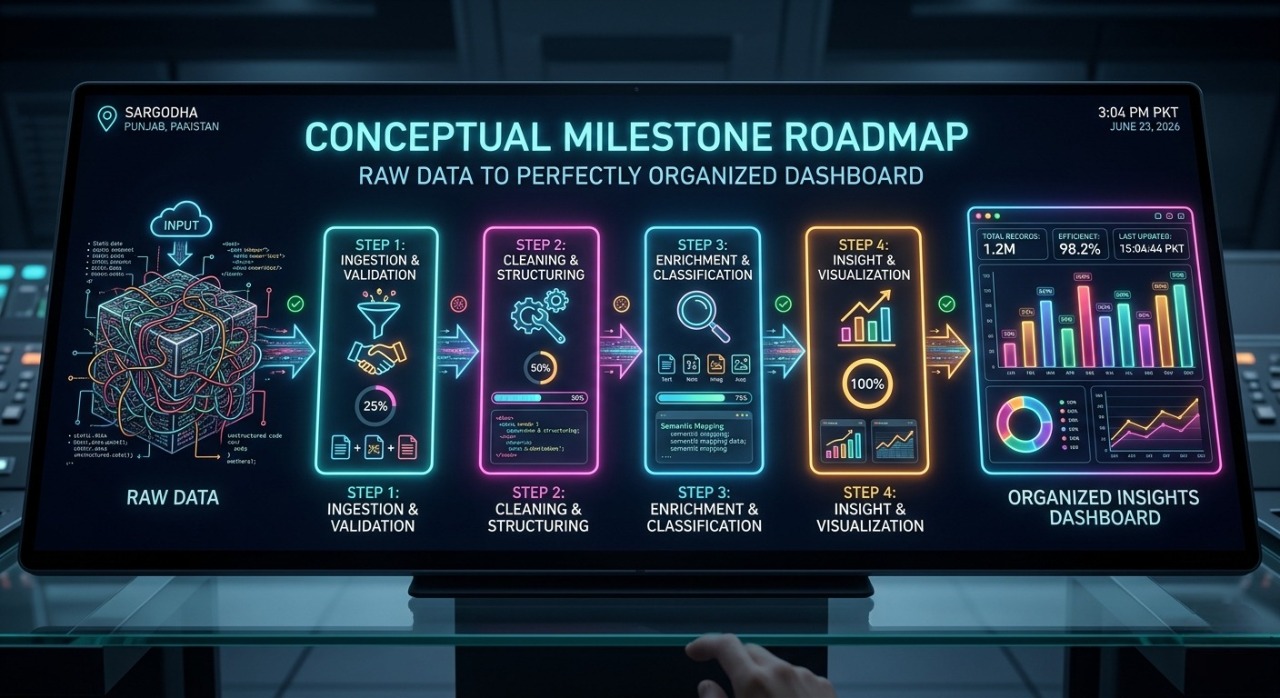
Transitioning your workflow to an AI-driven ecosystem doesn't have to happen overnight. Follow this structured roadmap to successfully deploy low-cost analytics:
Step 1: Define Your North Star Metrics
Before plugging data into any software, identify what problems you are trying to solve. Are you looking to minimize website bounce rates, optimize server performance, or forecast e-commerce sales trends?
Step 2: Consolidate and Centralize Your Data
AI models are only as good as the information they receive. Clean your local databases and connect your data streams (Google Analytics, Stripe, database instances) into a singular storage point or clean CSV file format before processing.
Step 3: Start with Open-Source or Freemium Tiers
Test platforms using free tiers or open-source software like KNIME first. This ensures the UI matches your team's technical skill level before you commit any monthly budget to premium subscriptions.
Step 4: Automate the Pipeline
Once you've verified the tool's accuracy, establish automated data pipelines. Set your AI software to pull data updates daily or weekly, removing manual file uploads completely.
Future Trends: What to Expect Next in Low-Cost Business Intelligence
The trajectory of AI indicates that data processing will only become cheaper and more localized. We are seeing a massive shift toward Edge AI Analytics, where data processing happens directly on local devices or lightweight servers rather than relying on expensive cloud calculations.
Additionally, the integration of specialized Large Language Models (LLMs) means that future automated data analysis for small businesses will offer highly contextualized advice. Instead of just showing a graph indicating sales are down, the software will actively review web traffic, identify a broken checkout button or failing landing page, and suggest the exact fix.

Final Thoughts: Choosing the Right Tool for the Job
Unlocking deep analytical insights no longer requires an enterprise budget. Whether you choose a conversational interface like Julius AI, a predictive modeler like Akkio, or a completely free open-source stack like KNIME, the tools available today give you immense processing power at minimal costs.
Analyze your specific business needs, take advantage of free trial tiers, and let machine learning do the heavy lifting for your data architecture.
Frequently Asked Questions (FAQs)
Q: Are free AI data analytics tools safe for sensitive customer data?
A: Open-source tools like KNIME process data locally on your machine, making them highly secure. For cloud-based tools, always check their data privacy compliance (GDPR/SOC2) policies before uploading sensitive databases.
Q: Can I use these tools if I don't know how to code?
A: Absolutely. Platforms like Polymer Search and Julius AI are designed explicitly for non-technical users, relying entirely on visual drag and drop systems or conversational English commands.